When I’m not doing art (so-so art, really), I work both as a day job and as a freelancer in web and multimedia design and development. Most of the time, that means I have to turn off the creative side of my brain and slog through whatever code comes next.

Sigh.

But occasionally (and hopefully more often quite soon), I get to work on fun, creative projects with multimedia, and today one of those projects was posted by Cemetery Dance Publications.  They needed a book trailer for Brian James Freeman’s book The Painted Darkness, so I worked on that for them.

Multimedia is always an interesting thing to work on, and there are quite a few steps involved in it.  What I like about it is that it’s not just how something looks now, but how it will look in a few seconds, or even minutes. There’s a choreography that has to go into it, and each piece has to flow together or none of it works.

That’s not to say my multimedia works always come out great, but I hope they work well and people like them.  In the case of the book trailer, I hope that people pick up the book of course, and maybe are intrigued by the possibilities.

I think that’s what a trailer is for… possibilities.  It’s not the final product, but it’s designed to get you there.  It’s a billboard really, something to get you quickly interested in getting the book (or the movie, or what have you).  I see plenty of trailers that are really long, and really involved, and I think that misses the point.  A trailer is to pique your interest, and, if it does it’s job well, should get you to follow where it wants to lead you.

I’m not sure if I succeeded or not, but I certainly hope so.  Here is the new book trailer, and please go check out the book at www.downloadthedarkness.com. You won’t be disappointed.


Tags: , , , , , , ,

I’m the first to admit, VisionCon coming up (go visit their site here!) is the first convention where I’ll actually be a guest.  That means for once I’ll need to be in the art show and be selling stuff.  I’m currently trying to decide what prints I want in the art show, what prints I should make and sell, selling postcards and bookmarks, and so on.

I’m also deciding what I should bring for my own self-promotion.  I’ll probably at least bring business cards and mini-cards, but talking online today with Cullen Bunn I also considered “monster cards’.

Monster cards were big in the 60′s-80′s especially.  They were horror-related cards, either straight horror or often with some amount of humor to them.  I though that would be a pretty good thing to bring, and here are a couple of initial ideas. Obviously, I have to throw my smart-ass nature in too.

Comments welcome, and needed!

Monster Cards

Monster Cards


Tags: , , , , ,

I’m working on a Flash book trailer for a  client (you’ll see soon enough, it’s not a small client), and for testing with converting Flash animation to video I decided to create a promo for my own art.

After a number of unique issues (I’m looking at you, Kaspersky), I was finally able to upload it to YouTube.  Check it out, all opinions are of course valued. Believe it or not, I also did the music for it.  Which isn’t half bad.


Tags: , , , ,

Years ago, when dinosaurs ruled the earth and I was but a young punk, I went to college to be a civil engineer.  The reasons I’m not now an engineer are for a later time, but I’ve never lost my love for beautiful architecture.

In the late 90′s and early oughts’, I dabbled in the idea of producing simple architectural design prints.  Other than the one and only print of the Villa Rotunda that my friend has, there have only been smaller versions on this site in my somewhat neglected design pages.

Below are a few samples, as always feel free to let me know what you think.  It might be something I try again, maybe large works in pen and ink or something instead of the vector graphics these are.

————————

————————

————————


Tags: , , , , ,

I thought I would return to the pulp art era again, I have a wonderful book by Robert Lesser called, simply, Pulp Art, which is fantastic. I think many of the artists in the book really set the stage for illustration art ever since, and I wanted to write a few blogs about them.

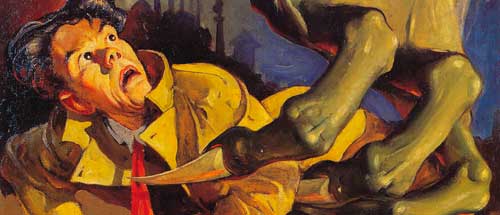
This is Edd Cartier’s cover for Unknown Fantasy Fiction, December 1939, and is a striking piece in both execution and in idea. There’s a real dramatic sense to the art, and it really would pull me in to read what’s inside.

I like Cartier’s use of color and contrast here. I think the bright yellow of the man’s jacket in the foreground fades nicely back along the green arm, back into the darkness.

There’s a real sense of depth here, and of a sense that (aside from the obvious claw) this isn’t a normal scene. Cartier uses the brightness and sharpness in the foreground to really help give us a sense of scale, letting the background blur and fade out nicely.

I like that the character’s face has a uniqueness to it as well, and that it’s not necessarily a “production” face.  You come away with the idea that this is an individual, that there’s a story here to follow. Cartier doesn’t just give us a generic victim, he gives us a unique person with a unique (although probably shortened) story.

Above all though, I just like the idea of the art and how it was executed.  I see it that this poor guy was knocked down, and was getting up in relative safety while the events in the background unfold.  As he starts to get up BAM! GIANT GREEN HAND TO MESS UP YOUR NIGHT!

That’s what I like about many of the pulp pieces, and especially this one.  There’s a story here, something that happened, or is about to happen (poor guy). If I saw this cover nowadays I would be drawn right to it, and in a cover you can’t ask for anything else.

Opinions?

ps – The image above comes from Lesser’s Pulp Art book, which is a fantastic tome on the sometimes forgotten, but brilliant art of the pulp era.  I highly suggest you pick it up, try here for starters.


Tags: , , , , , , , , , , , , ,

Most people that know me outside of family (both of you, you know who you are) know me as an artist.  But by day, and sometimes even at night, I am also a graphic designer.

Sometimes that means signs, or books, or even logos, which is the topic for today.  I created a logo for a client last night, and interestingly she asked what the ideas were behind the logo.  To be fair, the client did give me a good, if not nearly exact direction to head in.  But I came up with something a bit more abstract, and she was interested in how I thought of it.

Now, with art, I normally don’t have an answer for that.  Other than of course with story illustration, where the art is based on or at least influenced by the story.  I’m not a fruity “artiste” with a mission statement and such either.  Usually my answer is, and truthfully so, that I did it that way because a) that’s how it needs to be produced to look right or b) I thought it looked cool.

“Cool” is almost always the reason.

Of course there’s more than that.  There’s an understanding of how a piece will produced in the end, whether that’s on the web, in a book, on a coffee cup, and so on.  There’s also experience, I’ve been doing this for a long time (design especially) and there’s a knowledge from the past on how it should work. There’s hopefully some part of my brain as well that might have a smidgen of talent at these sorts of things, at least I hope that’s true.

But being asked, “why”, I decided that maybe I should examine why I created it as such.  To be fair, the client hasn’t picked a final version of it, and this is #1 of 3, so, grain of salt.

So, here we go.

This was the original sketch from the client, basically as an engineer they work with water, dams and making it so people that need either can get it.

Here’s the beginning, a rough vector version of the exact idea.  It’s a vector for a number of reasons, but mostly because it will be used in various things at various sizes and needs to be crisp no matter what (embroidery especially).  It will also only be 1-3 colors, so simplicity is perfect.

There was no real idea of fonts or anything, and I tend to take my dear sweet time finding them.  I tend to have a general idea of what I want, but I also waste a fair amount of time looking through all my fonts for the “right one”.  Mostly that’s because I’m a pain in the ass and far too picky for my own good.

Here’s a more finished version, with a better font and an added color.  The color will show up well with the blue, and add a little to it.  But I also thought at this point that it’s kind of boring, and not really very representative at all nor does it pique the interest. So I started fooling with it.

This is the quasi-final version (there are always client changes–always), and it’s far more abstract than the original idea.  I think it’s also more interesting and dynamic, and would be better at catching someone’s eye than the other version.

When she asked me earlier about the ideas, I gave it some thought and emailed her back.  I think it’s actually a pretty good answer, so here’s what I said:

The top one [note: again, there were three of them, the first two looked like the original idea] holds to the slanted dam wall idea that John started with, but makes further use of the left riser part of the “A” to make more of an idea that the water is being held back, and released in a controlled way as only the single drop.  The blue that appears to the left of the drop, behind the gold, indicates the water flowing behind the dam but being stopped (or converted) by the “A”.

Inadvertently, the overall design also is similar to a drill, which may or may not fit in this case.  It doesn’t have to read like that, but I thought it was an interesting side effect.  I also left off the background behind the “A” for a more dramatic effect., letting the left riser and the blue drop show it off.

I thought the gold complimented the blue well, and is lighter (and less emotionally ‘heavy’) than using something like black.  I chose more of a gold over pure yellow more because it would show up in printing/embroidery/etc. better, but also because the color could give indication of earth or some other material other than water.  It’s also not as graphically uninteresting as a gray concrete or gray-brown dam would be.

Well, there’s an insight into the design of that logo.  It may not be the one that’s used, or it may be tweaked, but I thought the “why did you do it” question was interesting enough to post.


Tags: , , , , , , , , , ,

My good friend Kirk Alberts suggested making my blog partly about design and art techniques, so I thought I’d give it a try.  This one’s on Photoshop’s Warp abilities.

One thing I missed from using Corel PhotoPaint all the time was the warp abilities that Photopaint had.  There were certainly ways around that in Photoshop, and maybe I just missed other easier ways.  It might have been that I didn’t like how they worked.  But I use it quite a bit in CS3, and it’s fantastic.

One thing I do a lot is use textures.  More often than not, those textures are further manipulated into whatever I need them to be, and often that’s on a flat (looking) surface.  But I find that sometimes that I need to texture a curved object, and make it look like the pattern is actually following the way it should.  That’s where warp comes in.

Let’s say I have a shape like this, that is really a snake (believe it or not) :

Black

Now, that’s not really an exciting snake, but let’s grab a skin I created and see what I can do:

skin

This is kind of a square peg in a round hole sort of problem, since the skin is a flat texture and the object is round.  We can overlay it and mask it and do all sorts of fun things, but it’ll still look like a flat paste on a curved object. Whatever shall we do?

Warp to the rescue.  All you have to do is put the skin layer over the black shape layer, and select the skin layer to transform it (CTRL T) like you normally would when you are resizing something.

[Note from the cheap seats: drop the layer opacity on the skin layer just a little, maybe to 90%.  Then you can see the underlying layer a little better.]

While it’s still in transform mode (in which you can still see the tiny box handles at the corners and sides), right click on the object.  A new menu pops out, and one of the choices is “Chicken-Hair-Pulling”.

Ok, obviously it’s not, but since you thought I was going to say “warp” it’s funny anyway. Once you select warp/chicken-hair-pulling, a new framework appears around the skin layer, like so:

warp

Each line and each dot on the grid can be grabbed, and pulled any which way you want. Wait, that sounds a bit… harassing.  Note to you people, no going out and grabbing things and pulling them which way you want.

Maybe I should say, the grid allows you to manipulate the layer freely, pulling it in any direction you want. In the case of the snake shape, it allows us to match the curve of the snake with a flat texture:

warp

Now, in my case, I decided to use the texture multiple times over the whole shape to give it a better sense, but your mileage may vary.  You can manipulate one texture until you like what you see, or you can use multiple layers and either clone, heal or smooth them out to match later. After entirely too much work for an animal that’s mostly covered by water (yeah, I am silly sometimes and far too anal retentive on art) mine looks like this:

It gives a nice, wrapped sort of feeling to the texture, and makes it look much less like just a slapped on, taped on paste job and more like a realistic animal.  This is a curvy, organic creature, and any sort of flatness would throw the whole thing off.

The technique works pretty slick for any sort of round or organic object, and it’s easy enough to finish it off with shading (freehand or otherwise), mask and layer tricks or even just by itself if that’s what you need.  I combined it with a different shot, and darkened for effect (from a story it’s based on).


Tags: , , , , , , , , , , , ,

Powered by Wordpress
Theme adapted by Russell Dickerson from BlueMod (blueblog_DE Theme by Oliver Wunder)
Original Theme © 2005 - 2009 FrederikM.de

Switch to our mobile site